
AI tools can assist you with writing, learning, researching, generating ideas, content creation, summarizing data, and performing routine tasks automatically. However, simply using an AI tool doesn’t mean that you’ll receive satisfactory results. Sometimes the quality of the outcome highly depends on the way you select an AI tool, interact with it, and check the outcome of your interaction with it.
If you’re new to artificial intelligence, mastering the skill of working with AI tools will help you to work efficiently and effectively and avoid becoming too dependent on AI.
In this tutorial how to use AI tools effectively will teach you 10 basic tips for working with AI tools, including tips on writing prompts, providing necessary context, checking information, protecting yourself from data breaches, and improving the results of the interaction with AI.
How to Use AI Tools Effectively: What It Really Means
Using the AI tools correctly requires understanding when to use AI, what kind of AI tool to use, what information should be provided, and how to analyze the output.
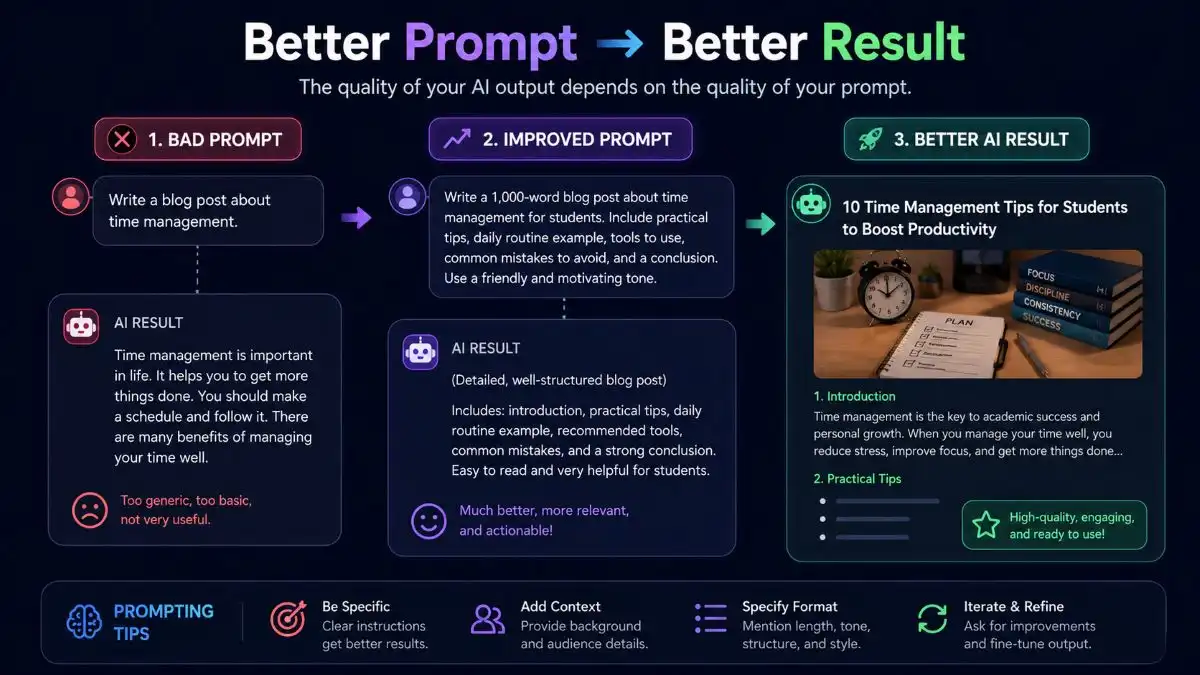
For example, instead of asking to the AI chatbot:
“Create an article on fitness.”
You might state:
“Write a beginner’s 1,500 words long article on working out at home with no gym equipment. Use simple language and provide a weekly schedule of workouts and an article structure.”
This second prompt provides much more detailed information about what exactly is you needed from the AI.
AI performs better when it is used as an assistant rather than a substitute for your judgment.
10 Essential Tips for Using AI Tools Effectively
1. Choose the Right AI Tool for Your Task
The first most important step is picking the right AI tool for becoming good at using these technologies properly.
There are many AI applications that specialize in specific areas. For example, some are oriented towards creation of content, others are focused on image generation, code-writing, research, presentation, video editing, or other productive tasks.
Ask yourself before you start using an AI tool the following questions:
What do I need to achieve?
What kind of output do I need? Text, images, videos, research, automation?
Is my task simple and can be solved by using a general-purpose AI chatbot?
Or does the task require using a specialized AI tool?
For example, brainstorming may require a general AI tool but generating images – a specific image generation tool is needed.
Advice: do not pick an AI tool just because it is popular.
If you’re completely new to AI, start by exploring our guide to the [AI tools for beginners] to find tools that are easier to start with.
2. Learn How to Write Better Prompts
A prompt is an instruction for the AI tool.
Being able to write specific prompts is one of the major skills a beginner should have.
An unclear prompt may give you a very general response:
“Give me some SEO tips.”
The more specific prompt would be:
“Give me 10 SEO tips for novice tech bloggers. Provide a clear description of each tip with an example.”
In this prompt, you specified the purpose, the audience, the complexity and the output format.
The most basic formula to create your prompts and make them more effective, use:
Role + Task + Context + Requirements + Output format
For example:
“Be a role of an SEO content strategist. Come up with 10 topic ideas for the blog posts for a technology beginner blog. The topics should be related to Windows problems and artificial intelligence technologies. Give a description for each idea.”
Also read Microsoft’s guide to writing effective prompts.
3. Give AI Enough Context
AI tools can only utilize the information that has been fed into them.
If the amount of context you give is minimal, the output generated would be too broad. Context can enhance the value of the output significantly.
For example: “Write me a social media post”
Tell AI:
“Write a short LinkedIn post for a technology blog for beginners that want to understand AI tools. Keep a tone professional and friendly also finish it with a question.”
You can provide information such as:
- Target audience
- Purpose
- Experience level
- Tone of voice
- Relevant context
- Any restrictions or requisites
- Samples of what you’re looking for
The more relevant information you give, the faster AI will understand what you want.
4. Be Specific About the Output You Want
Another correct way to use AI tools is to tell the AI in which format you want the answer.
Instead of just giving out a question, you can give specifications of how the answer should be formatted.
For example:
“Describe cloud computing to a beginner in 500 words. Keep it in short paragraphs, use three headings, include one example, and wrap up with a five-point summary at the end.”
The result you might ask an AI to produce can include things like:
- Bullet points
- Tables
- Step by step instructions
- Checklists
- Summaries
- Examples
- Comparisons
- FAQs
- Social media post captions
- Emails
Length, tone, reading level, and formatting preferences can also be specified by you.
It will make it easier for you to make use of the AI-generated content and minimize post-editing.
5. Don’t Accept the First AI Response as Final
One common beginner mistake is copying the first AI generated answer and considering that, task is finished. But AI generated content is often more like a starting point rather than the final product.
If the response isn’t quite right, then tell the AI what needs to change:
“Make this explanation simpler.”
Or:
“Rewrite this section for someone with no technical knowledge.”
You can also ask:
“Give me three alternative versions.”
“Make the examples more practical.”
“Remove repetitive info.”
“Make this more concise.”
This whole process of reviewing and refining is sometimes called repetitive prompting. Do not expect an answer to be perfect at once; work with the AI in several stages.
6. Verify Important Information
AI tool may give incorrect, obsolete, incomplete, or inaccurate data. It is one of the key aspects that beginners should understand.
The AI response can be very confident despite the mistake in the response.
Thus, do not rely on AI blindly when working with important data such as:
- Financial information
- Legal information
- Medical information
- Security recommendations
- Specifications
- Latest news
- Statistical data
- Specifications of products
Check your important facts by verifying them using official resources.
For example, if AI gives you some recommendations on how to change the critical Windows security setting, check them with the help of Microsoft’s official documentation.
Use AI to boost your research, but do not treat every statement generated by it as a verified fact.
7. Protect Your Personal and Sensitive Information
Before using an AI tool, pause for a moment and consider what you are actually typing or pasting.
Do not share any sensitive information until you fully understand how the service will use your data. Some people overlook this, and by the time they realize it, it is often too late.
Especially be careful with:
- Passwords
- Credit Card details
- Personal papers
- Authentication codes
- Personal Identification Information
- Business sensitive information
- Private Customer information
For example, if you need AI to summarize a document containing personal information, it is advisable to remove all such information from the document first.
AI can be very useful, but one should not compromise on privacy for the sake of convenience.
8. Use AI for Ideas and Assistance, Not Just Answers
However, many people use AI solely to ask questions and get answers. In reality, if you use it as a tool for thinking and as a productivity assistant, this technology can prove to be very helpful.
You can use AI to:
- Idea generation
- Outline creation
- Question creation
- Explanation of complicated things
- Text summarization
- Writing enhancement
- Identification of potential solutions to a problem
- Creating educational material
- Organization of information
- Example generation
For example, if you’re writing a blog post. You could ask AI to draft an outline first then you review that outline, and only after that you expand each section. This gives you more control over the final result.
Students can also explore our list of the [best AI tools for students] for studying, research, writing, and productivity.
9. Combine AI With Your Own Knowledge and Judgment
AI is there to help you out, not to completely replace what you can do.
If you are a student, then make use of AI to help you understand the complex ideas and draw connections, rather than copying the solutions.
If you are a writer, employ AI to brainstorm and edit content while providing your insights and experience.
If you’re a developer, use AI to explore possible solutions, and then you check them out.
In the end, your experience, creativity, judgment and critical thinking remain important.
A mindset that tends to work is :
AI + Human judgment = Better results
Usually the strongest outcomes happen when you mix AI’s speed with human decision making.
10. Practice and Build Your Own AI Workflow
The only way to master the skills needed to effectively leverage AI-powered tools is through practice.
With regular use, you will find out what works best for you.
There are prompts that you can develop and apply consistently whenever you carry out the same activity.
Let us consider a situation where you always write blog articles. There will be prompts that you will develop in line with:
- Target audience
- Preferred style of writing
- SEO considerations
- Article structure
- Formatting guidelines
- Internal linking guidelines
- Length of the article
You will only need to personalize such prompts for each blog post.
A Simple AI Workflow for Beginners
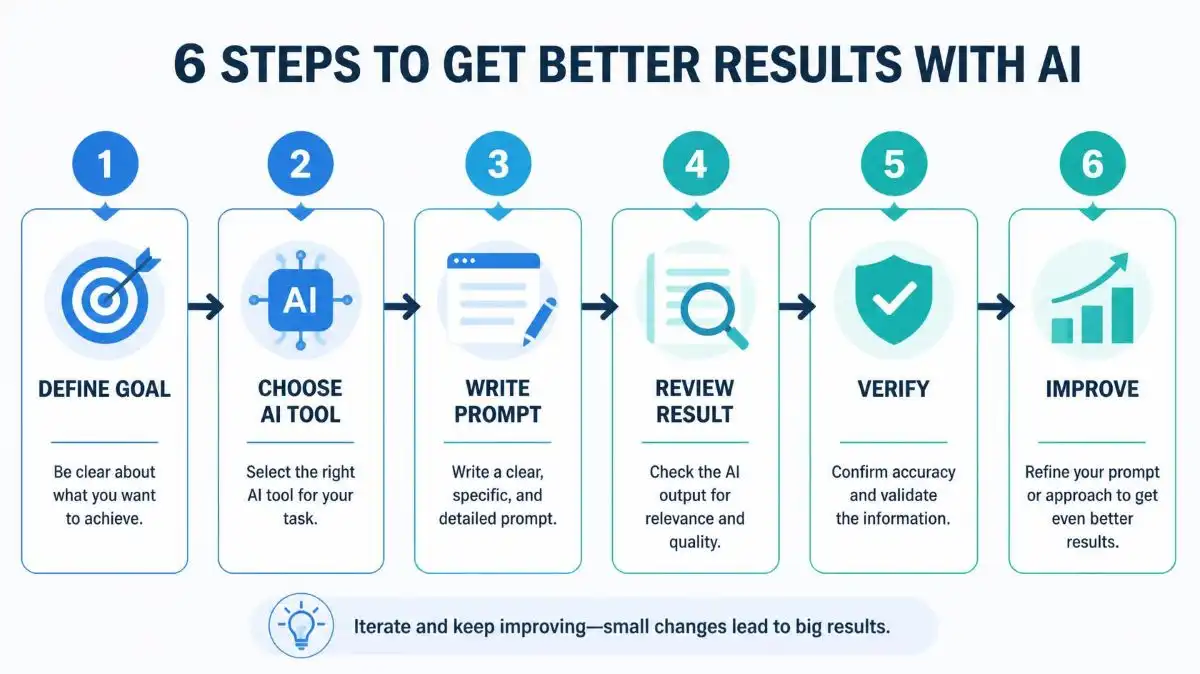
If you’re totally new to AI, then begin with this small, easy process:
Step 1: Define your goal
Figure out, very clearly, what you want the AI to help you get done. Like, be specific but not complicated.
Step 2: Pick the right tool
Choose an AI tool that fits your task, not just “any tool”. Make it match what you’re trying to do.
Step 3: Write a prompt that actually makes sense
Describe the work you want, and toss in any context that’s useful. The more relevant your background is, the better the response usually comes.
Step 4: Glance over what it gives you
Check for errors, missing pieces, or content that feels off-topic, or just kinda irrelevant.
Step 5: Request improvements
Tell the AI, what needs to change.
Step 6: Double-check key facts
If there are important facts, verify them using reliable sources. Don’t assume it’s automatically correct.
Step 7: Add your own judgment
Finally, tweak the result, personalize it, and edit it so it fits your intent before you actually use it.
Overall, this whole setup is pretty accessible for beginners yet still strong enough for tons of everyday things you might want to do.
Common Mistakes Beginners Should Avoid
When you learn to work with AI tools, stay away from these common mistakes:
Unclear prompts
Short prompts result in a generic output from the system.
Believing AI blindly
Sometimes AI makes mistakes, thus, you should never forget about reviewing the crucial information.
Wrong tool usage
Sometimes, it is more effective to use a specialized tool rather than an AI assistant.
Disclosure of sensitive information
It is not true that all AI services process your information in the same way.
Copy-pasting AI output
Usually, it is needed to review, edit, and transform AI’s output.
Expecting perfection immediately
Sometimes, it is necessary to improve the results of work through follow-up prompts.
Frequently Asked Questions (FAQs)
Q1. How can beginners use AI tools effectively?
Ans. Start with basic tasks, write prompt in a clear way, give enough background, and always recheck whatever the AI generated output .
Q2. How do I get better results from AI tools?
Ans. Describe the purpose, the audience, the tone and the preferred format; modify the prompt if needed depending on the initial response.
Q3. Can I trust everything AI tools generate?
Ans. No. An artificial intelligence can be wrong or obsolete; therefore, one should verify the information from other sources.
Q4. Do I need advanced prompt engineering skills?
Ans. No. Good results can be guaranteed if the processes are described well and comprehensively.
Q5. Is it safe to share personal information with AI tools?
Ans. Do not disclose any password, financial data, documents or other sensitive information unless you know something about how the software handles your information.
Q6. Can AI tools replace human judgment?
Ans. Artificial Intelligence can help with a lot of things, but the human judgment, creativity, and verifying facts is still necessary.
Conclusion
It is important to understand that learning how to utilize AI tools is not about discovering one super tool or creating complex prompts. It is about learning how to formulate your aim, how to provide context, analyze output and enhance your work.
Start from simple questions and learn through trial and error. Remember that you should not blindly follow AI. Critically evaluate the most important outputs, protect your privacy and make decisions on your own.
Eventually, you will start moving from simple questions to more complex workflows and combining different AI tools in order to increase your productivity.
It is important to note that you should not rely on AI completely. The key thing is to use AI smartly in order to perform more.